The Algorithmic Mandate: Workforce Transformation, Physical Infrastructure, and the Continuous Learning Paradigm in the Age of Agentic AI
By Robert Kroon
Executive Summary
An August Berres Juce Monitor Cart enables team meetings anywhere, anytime.
The integration of Artificial Intelligence (AI) into the global corporate infrastructure has transitioned from a phase of experimental adoption to a period of structural, non-negotiable mandate. Recent strategic pivots by global consulting leaders, most notably Accenture, have signaled the dissolution of the traditional employer-employee social contract, which historically prioritized tenure and generalist adaptability. The explicit declaration that employees who fail to acquire AI proficiency will be "exited" marks a definitive turning point in workforce management strategy.
This report provides an exhaustive analysis of this transition, investigating the depth of these policies, the resultant restructuring of physical and digital workspaces, and the emergence of a continuous learning ecosystem designed to mitigate rapid skill obsolescence.
This analysis posits that the demand for AI proficiency necessitates a radical reimagining of the corporate environment. If the workforce must be AI-capable, the environment must be robustly designed to support high-compute, high-context workflows. This necessitates the deployment of multi-monitor "cockpit" configurations, agile spatial layouts, and high-performance local hardware capable of running large language models (LLMs) and agentic systems. Furthermore, we examine the lifecycle of AI skills, arguing that "learning AI" is not a static milestone but a continuous, rapid-cycle process that is redefining corporate training infrastructure and reviving the need for physical, on-site centers of excellence.
Part I: The Shift from Voluntary to Mandatory AI Proficiency
1.1 The Accenture Precedent: Deconstructing the "Exit" Policy
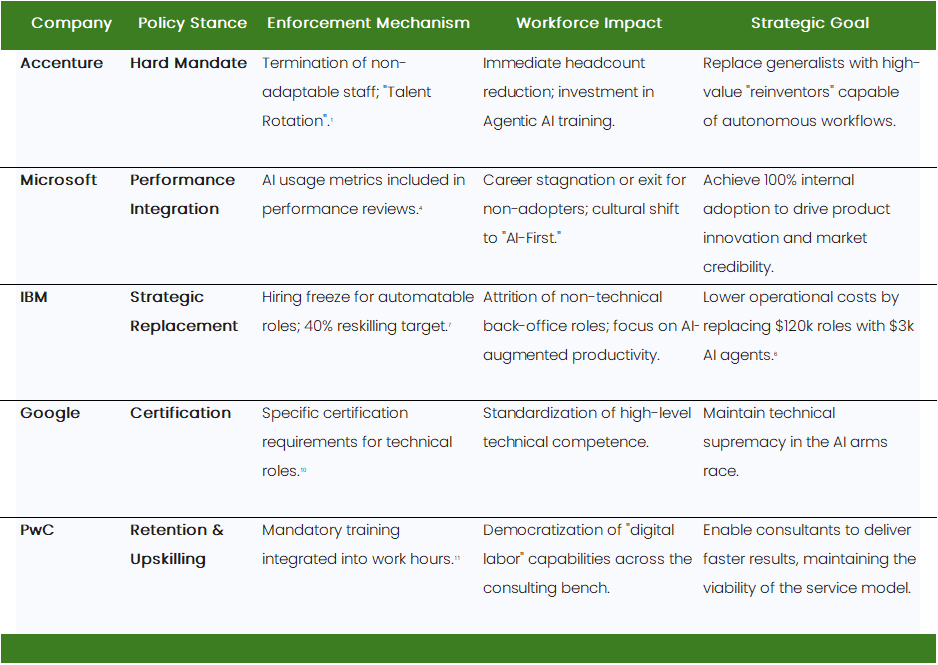
The corporate landscape received a stark, unequivocal signal regarding the future of labor with Accenture's recent strategic restructuring. The firm’s decision to terminate approximately 11,000 employees—part of a broader reduction that saw the global headcount drop from 791,000 to 779,000 in a single quarter—was explicitly linked to a strategic pivot toward AI-driven operations.1 While layoffs in the technology sector are not novel, the rationale provided by Accenture’s leadership introduces a new paradigm in human capital management. CEO Julie Sweet provided a candid justification that serves as a critical case study for modern workforce strategy: the company is "exiting people on a compressed timeline where reskilling is not a viable path for the skills we need".1
This statement fundamentally challenges the long-held corporate benevolent orthodoxy that any employee can be retrained for any role given sufficient time and resources. Accenture’s stance suggests a new, harsher reality: the velocity of AI advancement creates a skills gap that traditional reskilling methodologies cannot bridge quickly enough to meet client demand. The firm is effectively replacing generalist roles with those capable of leveraging "Agentic AI"—systems designed to automate complex, multi-step tasks autonomously rather than merely augmenting simple processes.1
The implications of this "talent rotation," as Sweet euphemistically terms it, are profound.3 It suggests that AI proficiency is no longer a value-add skill or a pathway to promotion, but a baseline requirement for retention. The restructuring, costing $865 million, is not merely a cost-cutting exercise but a capital reallocation toward AI-proficient talent and the acquisition of specialized firms such as Aidemy Inc. to bolster training capabilities.1 This indicates that while reskilling is occurring—Accenture is investing heavily in its "reinventors"—it is selective. The company is applying a triage model to its workforce: investing in high-potential employees while displacing those unable to adapt at the required velocity.2 Despite these aggressive cuts, Accenture reported a 7% year-on-year revenue increase, reinforcing the market's validation of this "leaner, smarter" approach.1
1.2 Industry-Wide Adoption: The Contagion of the Mandate
Accenture is not an outlier; rather, it serves as a bellwether for the professional services and technology sectors. A comparative analysis of major firms reveals a synchronized shift toward mandatory AI proficiency, although the mechanisms of enforcement vary from direct termination to performance-based filtering.
1.2.1 Microsoft: The "No Longer Optional" Doctrine
Microsoft has arguably taken the most aggressive internal stance regarding AI adoption, embedding the technology directly into the performance management hierarchy. Reports indicate that the company has explicitly communicated to managers that "using AI is no longer optional" and is "core to every role and every level".4 This directive has moved beyond rhetorical encouragement into actionable policy; managers are now required to evaluate employees based on their usage of internal AI tools, specifically Microsoft Copilot.4
This introduces a new, quantifiable metric into performance reviews: AI utilization. By integrating AI adoption into the formal evaluation process, Microsoft ensures that resistance to the technology directly impacts career advancement, compensation, and job security.5 This approach differs from Accenture’s "fire and replace" model by attempting to force adaptation through administrative pressure. However, the end result—a workforce where non-users are functionally obsolete—is identical. The rationale is competitive necessity; organizations that treat AI adoption as optional risk being outpaced by competitors where every employee operates with AI-augmented capabilities.4
1.2.2 IBM: The Freeze and Reskill Strategy
IBM has adopted a hybrid approach characterized by strategic attrition and aggressive reskilling targets. The company has paused hiring for roles it believes can be replaced or heavily augmented by AI, specifically targeting back-office functions such as human resources and administrative support.6 Simultaneously, IBM executives estimate that 40% of their workforce will need to reskill over the next three years due to AI and automation implementation.7
This "hiring freeze" acts as a passive filter, preventing the influx of non-AI talent, while the internal pressure to reskill increases. IBM’s strategy highlights a crucial economic calculation: for many operational roles, the cost of human labor (averaging $120k) versus AI operation ($3k) makes the transition inevitable.6 The "mandate" here is economic; employees who cannot leverage AI to justify their premium over automated agents face displacement. The focus is shifting towards "Agentic AI," which IBM asserts will transform business models, necessitating that employees understand how to manage these autonomous agents.9
1.2.3 Google and PwC: Certification and Retention
Google has implemented stringent requirements for its technical staff, mandating specific certifications (e.g., Professional Machine Learning Engineer) for certain roles to ensure a baseline of competence.10 This moves the mandate from "usage" to "verified expertise."
Similarly, PwC (PricewaterhouseCoopers) has linked AI upskilling directly to retention and job security. The firm’s research indicates that mandating upskilling as part of the normal workday improves retention and productivity.11 However, the underlying threat remains: as client demand for AI solutions grows, the "billable hour" model of consulting relies on consultants who use AI to deliver faster results. Those who cannot are effectively unbillable. PwC’s strategy emphasizes "democratizing expertise," acknowledging that AI helps people rapidly build expert knowledge, potentially making formal degrees less relevant than demonstrated tech fluency.12
1.3 The Divergence of "Builders" vs. "Users"
It is critical to distinguish between the two distinct types of AI mandates emerging in these organizations, as the expectations and risks differ significantly.
The Builders: This group, estimated at 5% of the workforce, comprises data scientists, ML engineers, and solution architects.7 For them, the mandate is technical depth—mastering new architectures, agentic frameworks, and model fine-tuning. Their value lies in creating the systems that the rest of the organization uses.
The Users: This represents the remaining 95%—consultants, marketers, HR, and administrators.7 For them, the mandate is fluency and application. They are not expected to code neural networks but to use LLMs (Large Language Models) to restructure workflows, automate communications, and generate insights.
The "terminate" risk is arguably higher for the "Users." A "Builder" with outdated skills might still be a competent programmer who can pivot. A "User" who refuses to use AI is competing against peers who can produce 40% more output with higher quality.14 In this context, the refusal to learn AI is functionally equivalent to a refusal to use email or word processing software in the 1990s.
1.4 The Counter-Narrative: Offshoring and the "Smoke Screen"
While corporate messaging focuses on "efficiency" and "innovation," a significant counter-narrative exists among the workforce, particularly within the consulting and technology sectors. Analysis of employee sentiment on platforms like Reddit and Blind suggests that "AI mandates" may, in some instances, serve as a smoke screen for traditional cost-cutting and offshoring.
Employees report that while executives tout bold AI strategies to the press, internal tools are often blocked due to IP concerns, yet layoffs proceed.16 This disconnect leads to skepticism, with many viewing the "AI" label on layoffs as a convenient PR justification for replacing expensive domestic labor with cheaper offshore resources in regions like India, China, and Brazil.16 The skepticism is compounded by reports that domestic employees are being replaced by offshore workers who are ostensibly "AI-enabled" but fundamentally represent a labor arbitrage strategy.17 This perspective suggests that the "mandate" is not just about skill acquisition but about justifying a lower cost basis for labor under the guise of technological advancement.
1.5 Regulatory Pushback: The Legal Defense Against Obsolescence
The aggressive push for AI-driven displacement has triggered a legislative response, particularly in the United States, aimed at protecting workers from algorithmic termination and mandatory training of their own replacements.
1.5.1 State-Level Protections
Several states have introduced or passed bills to curb the unchecked power of AI in employment.
Illinois: Laws passed in 2025 prohibit the use of AI to replace mental health professionals or community college faculty, establishing a precedent that certain "human" roles are protected from automation.18
California: Legislation defines community college faculty as "humans," protecting educators from AI displacement. Furthermore, bills introduced in 2024 and 2025 aim to protect court reporters, call center workers, and healthcare professionals from automated replacement.18
New York: A 2025 bill proposes prohibiting AI from replacing media workers, directly addressing the threat to creative professionals.18
1.5.2 Transparency and "Training Your Replacement"
A critical area of legislative focus is the practice of forcing employees to train the very AI systems that will displace them. Policy models are emerging to ensure workers have control over their work product and are not coerced into training AI replacements.18 Additionally, New York state updated its Worker Adjustment and Retraining Notice (WARN) laws to require companies to disclose if layoffs are due to technological innovation or automation, adding a layer of transparency to the "restructuring" narrative.18
These legislative efforts represent a friction point against the "mandate." While corporations push for rapid "talent rotation," governments are erecting guardrails to slow the pace of displacement and ensure that the "efficiency gains" of AI do not come entirely at the expense of labor stability.
1.6 Comparative Analysis of Corporate AI Mandates
Part II: Robust Workplace Design – The Infrastructure of Intelligence
This raises a critical second-order question: If employees are expected to wield powerful AI tools, does the physical and digital workplace need to change? The research overwhelmingly suggests that the "standard corporate laptop" setup is insufficient for the AI-enabled professional. The cognitive load of AI orchestration requires a corresponding upgrade in physical infrastructure.
2.1 The Multi-Monitor Imperative: The "Cockpit" Configuration
August Berres Respond! workstations are designed with enough power and receptacles to support multi-monitor and wide-screen configurations.
The effective use of Generative AI establishes a new workflow paradigm that is inherently multi-modal and context-heavy. Unlike traditional linear work (e.g., writing a document), AI-augmented work involves a dynamic interplay between the human, the prompt interface, the source material, and the generated output. This shift demands a "Command Center" or "Cockpit" approach.19
2.1.1 The Productivity Argument
Research consistently demonstrates that multi-monitor setups increase productivity by approximately 42%.20 In the context of AI, this gain is likely amplified. The workflow of an AI-augmented worker involves:
Prompt Engineering (Context A): Formulating and iterating prompts in a chat interface.
Verification (Context B): Reviewing the AI's output for hallucinations or accuracy against internal data.
Reference (Context C): Consulting source documentation, codebases, or legal texts.
Integration (Context D): merging the verified output into the final deliverable.
Performing this complex loop on a single screen forces constant "Alt-Tab" context switching, which breaks flow, increases cognitive load, and significantly raises error rates.22
2.1.2 Recommended Configurations for AI Roles
Different AI roles require distinct physical configurations to maximize efficiency:
The AI Developer/Data Scientist: This role requires the most robust setup, often mimicking financial trading desks.
Configuration: Triple-monitor array or a combination of ultra-wide and vertical displays.19
Primary Display: High-resolution (4K), often Ultra-wide (34"+) for timeline scrubbing, massive codebases, or side-by-side diff reviews.24
Secondary Display (Vertical): Dedicated to code execution logs, terminal windows, or long documentation streams. Vertical orientation is vastly superior for reading the long, linear outputs generated by LLMs or chat logs.26
Tertiary Display: Communication tools, reference materials, or video conferencing.
The AI-Augmented Knowledge Worker: Even for non-developers, dual monitors are now the baseline minimum.21 One screen serves as the "creation" canvas (Word, PowerPoint), while the second serves as the "intelligence" pane (Copilot, ChatGPT). This physical separation allows for real-time verification of AI assertions, a critical step in mitigating the risk of hallucinations.29
2.2 Compute Power: The Return of the Workstation
For years, the trend in corporate IT was toward "thin clients"—lightweight laptops relying on cloud computing. The AI mandate is reversing this trend for a significant segment of the workforce. While cloud-based LLMs (like GPT-4) handle heavy lifting remotely, issues of data privacy, latency, and the rise of "Local LLMs" are driving a need for robust local compute power.
2.2.1 Local Inference and Privacy
Many organizations, fearing IP leakage, are deploying local, private AI models that run on-premise or directly on user devices.30 To run a model effectively, the endpoint hardware must be powerful.
GPU Requirements: The AI-proficient workplace must provide workstations equipped with significant GPU capabilities. For development and local training, consumer cards like the NVIDIA RTX 4090 (24GB VRAM) or workstation-class RTX 6000 Ada Generation (48GB+ VRAM) are becoming standard. This allows developers to run inference locally without sending sensitive code to the cloud.31
RAM Demands: AI models are memory-hungry. While a standard office PC might have 16GB of RAM, an AI workstation often requires 64GB to 128GB DDR5 RAM to load model weights and handle large datasets effectively.32
CPU Specifications: High-core count processors are essential for data preprocessing and handling multi-threaded workloads. AMD Threadripper Pro (24-96 cores) and Intel Xeon W-series are recommended for high-end workstations, providing the PCIe lanes necessary for multi-GPU setups.30
This shift implies that the physical office must handle higher power densities and heat generation. The "robust" workplace is not just about furniture; it is about electrical and HVAC infrastructure capable of supporting a fleet of mini-supercomputers.30
2.3 Ergonomics in the High-Velocity Environment
The intensification of work through AI brings new ergonomic risks. The "efficiency" of AI means fewer micro-breaks (e.g., pausing to think of a word, waiting for a file to load). AI generates content instantly, keeping the human in a state of constant processing and review.
Visual Ergonomics: With 3-4 monitors, eye strain is a primary concern. Monitors must have high refresh rates (120Hz+) and proper color accuracy (IPS panels) to reduce fatigue.24 The layout must be curved or angled (cockpit style) to maintain a consistent focal distance.19
The Role of the Ergonomist: The field of ergonomics is evolving to partner with AI. "Ergonomists" are now using AI-driven computer vision to assess worker posture in real-time.36 However, the human element remains crucial; ergonomists must interpret this data to design workspaces that account for the mental stress and static posture of AI-augmented work, ensuring that efficiency does not come at the cost of musculoskeletal health.38
Physical Ergonomics: The sedentary nature of high-focus AI monitoring requires advanced seating and sit-stand desks. The "human-in-the-loop" role is physically static but mentally hyper-active. Ergonomic assessments must now account for multi-monitor neck strain.39
2.4 The Generative UI Future
Looking forward, the need for complex multi-monitor setups might eventually be mitigated by Generative UI. This emerging technology uses AI to create and adapt user interfaces in real-time, presenting dashboards that rearrange themselves based on the user's immediate workflow needs.41 Instead of static screens, a Generative UI might consolidate necessary information into a single, dynamic view, potentially reducing the need for "screen real estate" sprawl. However, until this technology matures, the multi-monitor cockpit remains the standard for high-performance AI work.
Part III: Agile Workplaces and Spatial Collaboration
Are "agile workplaces" a necessary corollary to AI-skilled teams? The research suggests that the organizational structure of AI teams—specifically their cross-functional nature—demands a specific type of physical layout that facilitates "Superagency."
3.1 The Cross-Functional AI Pod
With August Berres Agile Workplace Designs, Cross-functional teams can be organized in a matter of minutes.
AI development and implementation are rarely solitary endeavors. They require the collaboration of diverse experts.42 A functional AI team (or "Pod") typically consists of:
AI Engineers: To build and fine-tune the models.43
Domain Experts: To validate the output (e.g., a lawyer verifying a legal contract generated by AI).
Data Ethicists/Compliance Officers: To ensure the model isn't hallucinating, biased, or violating regulatory frameworks.44
Product Managers: To align the AI with business goals and translate technical capabilities into user value.43
Prompt Engineers: A specialized role focused on optimizing the input for LLMs.44
3.2 Designing the Agile Space
Traditional cubicles inhibit the rapid communication required by these pods. An agile workplace for AI is characterized by:
War Rooms / Squad Rooms: Dedicated spaces where the cross-functional team sits together. These rooms require persistent digital displays (smartboards) to visualize data flows, model architectures, and real-time analytics.45
Reconfigurable Furniture: The furniture and technology must be adaptable. As AI projects move from "training" (intense, quiet focus) to "red teaming" (collaborative, noisy debugging) to "deployment" (monitoring), the physical space must shift to accommodate these distinct modes of work.45
Agile Marketing Pods: In marketing specifically, the "pod" structure allows for rapid iteration of AI-generated content. These teams require spaces that facilitate the "scrum" methodology, with daily stand-ups and visual Kanban boards (digital or physical) to manage the high volume of assets generated by AI tools.47
3.3 Spatial Collaboration and the "Digital Twin"
For hybrid teams, physical spaces are being augmented with "Spatial AI" and AR/VR tools. This allows remote members to interact with 3D data visualizations or persistent whiteboards as if they were in the room.49
AI-Enhanced Meeting Rooms: Modern meeting spaces are equipped with AI sensors that track room usage, occupancy, and ambient noise to optimize the environment automatically.46
Digital Twins: In sectors like manufacturing and logistics, companies are building "digital twins" of their physical facilities. These virtual replicas allow AI teams to train robots and optimize workflows in a risk-free simulation before deploying them to the physical floor.50 This requires a physical workspace where the "digital twin" can be manipulated and viewed, often using large-scale visualization walls or VR headsets.
Part IV: The Lifecycle of Learning – Continuous, Not Event-Based
Is "learning AI" a one-time event? The evidence offers a definitive "no." The shelf-life of technical skills is collapsing, necessitating a move from "training" to a "continuous state of learning."
4.1 The Shrinking Half-Life of Skills
Historically, a professional skill might remain relevant for 10 years. Today, the "half-life" of a learned skill is estimated to be five years, and for AI skills specifically, it may be as short as two years.7
Model Obsolescence: An employee trained on GPT-3.5 prompt engineering in 2023 found those specific techniques (like "step-by-step" reasoning) automated or internalized by GPT-4o in 2024. The "skill" became a built-in feature.
Tool Turnover: The landscape of tools shifts rapidly. A developer might master PyTorch, only to find the industry shifting to JAX or a new abstraction layer within 18 months. This creates a "Red Queen" effect: employees must run as fast as they can just to stay in the same place.
4.2 The "Learning in the Flow of Work" Model
Because the technology evolves faster than a standard university curriculum can be written, training cannot be restricted to annual seminars or degrees. It must be "embedded in the flow of work".52
Micro-Learning: Platforms like Degreed and EdCast are facilitating "just-in-time" learning—short, targeted modules consumed when a specific problem arises. Capgemini, for example, trained 150,000 employees in just 10 weeks using a campus-style rapid upskilling program.53
AI Tutors: Ironically, AI is being used to teach AI. Microsoft Copilot and custom corporate GPTs act as real-time tutors, correcting code or suggesting better prompts as the employee works.54 This turns every workday into a training session.
Amazon's "AI Ready": Amazon has committed to training 2 million people by 2025 through its "AI Ready" initiative. This includes free courses like "Foundations of Prompt Engineering" and "Building Language Models on AWS," designed to be accessible to anyone, democratizing the skills required to enter the AI workforce.55
4.3 Corporate Academies: The Institutional Response
To manage this continuous process, organizations are structuring learning into tiers and establishing dedicated academies.
Fluency (All Employees): Basic understanding of GenAI, ethics, and data privacy. This is the baseline for retention.58
Application (The Users): Role-specific training. How to use AI for HR, for Marketing, for Legal. This requires frequent updates as models gain new capabilities.59
Creation (The Builders): Deep technical training on model architecture, fine-tuning, and MLOps.
Deloitte AI Academy: Deloitte has structured its training into specific tracks, such as "AI Fluency for All," "AI Leadership for Managers," and intensive bootcamps for data scientists. This structured approach ensures that training is aligned with strategic business goals and is not just a "perk" but a core operational requirement.58
4.4 The Dark Side of Mandatory Training: Cheating and Burnout
The pressure to upskill has created perverse incentives and negative outcomes.
The Cheating Epidemic: A report by Moodle reveals that over 52% of US employees use AI to complete mandatory work training. This includes using AI to answer difficult questions (21%) or even taking the entire training on their behalf (12%).60 This suggests that for many, mandatory AI training is viewed as a bureaucratic hurdle rather than a learning opportunity.
Burnout: The same report indicates that 66% of employees are experiencing burnout, driven in part by the anxiety of AI displacement and the additional workload of mandatory upskilling.60 The "always-on" learning culture, combined with the threat of "exit," is creating a stressed and potentially disengaged workforce.
Part V: The Return of Physical Training Centers
Should "training centers" be part of the AI-proficient workplace? Contrary to the remote-work trend, major consulting firms and tech giants are investing heavily in physical centers of excellence (CoEs). These are not traditional classrooms, but high-tech laboratories designed for "co-creation."
5.1 The Rise of AI Experience Centers and Studios
Physical training places are important elements of an AI-ready workplace.
Both Accenture and Deloitte have launched global networks of physical spaces dedicated to AI innovation and training.
Accenture GenAI Studios: Located in strategic hubs like Chicago, Houston, New York, and Tokyo.62 These studios are specialized by industry (e.g., Houston for energy, New York for finance). They serve as "co-creation" spaces where clients and employees can physically experiment with AI hardware and software, rapidly prototyping solutions in a controlled environment.64
Deloitte AI Experience Centers: Facilities in locations like Bengaluru, Cairo, and across Europe feature "Digital Twins" and simulation capabilities.50 These centers allow teams to simulate physical environments (warehouses, factories) to train AI agents before deploying them in the real world.51
5.2 Why Physical Spaces Matter for AI Training
Why build physical labs for digital technology?
Hardware Access: As noted in Section 2.2, "robust" AI often requires expensive, high-heat, high-power hardware (GPU clusters) that cannot be easily distributed to home offices. A CoE provides centralized access to supercomputing power.50
Collaboration & Trust: Building "Agentic AI"—systems that act on behalf of the company—requires deep trust and rigorous testing. "Red Teaming" (trying to break the AI) is a collaborative, high-bandwidth activity best done in person to capture nuances and immediate feedback.29
Immersive Simulation: For industries like manufacturing or robotics, "Physical AI" requires interacting with the real world. Training centers equipped with robotics, sensors, and IoT devices allow employees to bridge the gap between code and physical execution.66 Startups like Wandercraft (exoskeletons) and RobCo (modular robots) exemplify the need for physical testing grounds that purely digital remote work cannot provide.67
Signal of Value: Investing in physical centers signals to the workforce that the organization is committed to their development, potentially countering the anxiety caused by the "learn or leave" mandates. It provides a tangible "home" for the abstract concept of AI transformation.60
Part VI: Implications and Strategic Outlook
The convergence of mandatory upskilling, robust physical infrastructure, and continuous learning creates a new operating model for the modern enterprise.
6.1 The Bifurcation of the Workforce
We are witnessing the bifurcation of the workforce into "Super-Users" and "Task-Executors."
Super-Users: Employees equipped with triple monitors, local GPU workstations, and continuous access to AI Studios. They leverage "Superagency" to control AI swarms and deliver exponential value.42
Task-Executors: Those who fail to adapt or are denied access to these tools. They face a shrinking role, relegated to tasks that are either too cheap to automate or require physical presence that robots cannot yet provide.
6.2 The Risk of "Fake" AI Adoption
The Moodle data on cheating suggests a significant risk of "fake" adoption. Companies may think their workforce is upskilled based on completion certificates, while in reality, employees are using AI to bypass the learning process. This creates a "knowledge debt" that could be catastrophic when the AI systems fail and human intervention is required.
Recommendation: Organizations must move from "completion-based" training to "demonstration-based" assessments (e.g., hackathons, practical simulations in AI Studios) to verify true competence.
Conclusion
The statement by Accenture is not a bluff; it is a forecast. The transition to an AI-first economy necessitates a "robust" workplace in every sense of the word:
Robust Policy: Mandates that ensure competence but are balanced with transparency and realistic learning pathways to prevent burnout.
Robust Infrastructure: Physical workstations that resemble developer cockpits, powered by significant local compute and ergonomic design.
Robust Support: Physical centers of excellence that facilitate deep, collaborative learning and access to specialized hardware.
Learning AI is indeed a continuous process, intrinsic to the future of work. The organizations that survive this transition will be those that treat their physical workspaces and training programs not as overhead, but as critical engines of the "Superagency" required to wield Artificial Intelligence effectively.
About the author
Bob Kroon is a recognized thought leader and innovator with over four decades of experience in the electro-mechanical and furniture industries. As the CEO and founder of August Berres, he envisions overcoming the limitations of traditional building power by enabling the Agile Workplace through a smart power ecosystem.
Bob passionately advocates for technologies such as building microgrids, fault-managed power (FMP), and battery-powered Agile Furniture, which are transforming the design and utilization of commercial spaces. Under his leadership, a suite of innovative solutions has been brought to market, including Respond!, Juce, CampFire, and Wallies. These products empower building owners, architects, and facility managers to retrofit buildings for today’s dynamic work environment.
Discuss Your Workplace Needs with Us
Contact Us Now
Works cited
Accenture fired thousands of employees; CEO Julie Sweet warns, exit or .... - Times of India, accessed November 21, 2025, https://timesofindia.indiatimes.com/technology/tech-news/accenture-fired-11000-employees-ceo-julie-sweet-warns-exit-or-/articleshow/124160673.cms
Accenture Lays Off 11,000 Staff as Part of AI Reskilling Strategy - CX Today, accessed November 21, 2025, https://www.cxtoday.com/contact-center/accenture-lays-off-11000-staff-as-part-of-ai-reskilling-strategy/
Accenture CEO Sees AI as a Long-Term Growth Driver - YouTube, accessed November 21, 2025, https://www.youtube.com/watch?v=2HabAoy3nv4
Why Microsoft's "Use AI or Hurt Your Career" Mandate Should Wake Up Every Executive Still Treating AI as Optional, accessed November 21, 2025, https://chiefaiofficer.com/blog/why-microsofts-use-ai-or-hurt-your-career-mandate-should-wake-up-every-executive-still-treating-ai-as-optional/
'No longer optional' - is it OK for Microsoft to make employee AI usage mandatory?, accessed November 21, 2025, https://www.hrgrapevine.com/us/content/article/2025-06-30-no-longer-optional-is-it-ok-for-microsoft-to-make-employee-ai-usage-mandatory
IBM just laid off 8000 workers to AI - the math behind what they actually saved - Reddit, accessed November 21, 2025, https://www.reddit.com/r/AI_Agents/comments/1ov28v7/ibm_just_laid_off_8000_workers_to_ai_the_math/
AI Puts The Squeeze On The Shrinking Half-life Of Skills - Forbes, accessed November 21, 2025, https://www.forbes.com/sites/joemckendrick/2024/04/30/ai-puts-the-squeeze-on-the-shrinking-half-life-of-skills/
New IBM study reveals how AI is changing work and what HR leaders should do about it, accessed November 21, 2025, https://www.ibm.com/think/insights/new-ibm-study-reveals-how-ai-is-changing-work-and-what-hr-leaders-should-do-about-it
5 Trends for 2025 - IBM, accessed November 21, 2025, https://www.ibm.com/thought-leadership/institute-business-value/en-us/report/business-trends-2025
Generative AI Specialization: Certification & Skill Badge Requirements, accessed November 21, 2025, https://partner.skills.google/paths/422
Next in consumer markets workforce: Trends impacting labor in 2025 - PwC, accessed November 21, 2025, https://www.pwc.com/us/en/industries/consumer-markets/library/next-in-consumer-markets-workforce.html
The Fearless Future: 2025 AI Jobs Barometer - PwC Ireland, accessed November 21, 2025, https://www.pwc.ie/reports/ai-jobs-barometer.html
The Fearless Future: 2025 Global AI Jobs Barometer - PwC, accessed November 21, 2025, https://www.pwc.com/gx/en/issues/artificial-intelligence/job-barometer/2025/report.pdf
Leverage AI for workforce optimization and growth - KPMG International, accessed November 21, 2025, https://kpmg.com/us/en/articles/2025/optimize-your-workforce-with-ai.html
Custom AI Workflows: How to Design Your Own Productivity System - Calendar App, accessed November 21, 2025, https://www.calendar.com/blog/custom-ai-workflows-how-to-design-your-own-productivity-system/
The age of AI layoffs is already here. The reckoning is just beginning : r/technology - Reddit, accessed November 21, 2025, https://www.reddit.com/r/technology/comments/1kx7c6v/the_age_of_ai_layoffs_is_already_here_the/
Im already seeing AI condense the jobs of 3-4 people to 1 person : r/Layoffs - Reddit, accessed November 21, 2025, https://www.reddit.com/r/Layoffs/comments/1o5fo7l/im_already_seeing_ai_condense_the_jobs_of_34/
The Current Landscape of Tech and Work Policy in the U.S.: A Guide to Key Laws, Bills, and Concepts - UC Berkeley Labor Center, accessed November 21, 2025, https://laborcenter.berkeley.edu/tech-and-work-policy-guide/
Creator Desk Setups for Multi-Monitor Workflows - Eureka Ergonomic, accessed November 21, 2025, https://eurekaergonomic.com/blogs/eureka-ergonomic-blog/creator-multi-monitor-desk-setup
Enhance Study Flow with Dual Monitors | Microsoft Surface, accessed November 21, 2025, https://www.microsoft.com/en-us/surface/do-more-with-surface/enhance-study-flow-with-dual-monitors
How to Set Up Dual Monitors: Boost Productivity | HP® Tech Takes, accessed November 21, 2025, https://www.hp.com/us-en/shop/tech-takes/dual-monitor-setup-for-work
Productivity Impact of Multiple Monitors - Plugable Technologies, accessed November 21, 2025, https://plugable.com/blogs/news/productivity-impact-of-multiple-monitors
Triple Monitor Configurations: Step by Step - Autonomous, accessed November 21, 2025, https://www.autonomous.ai/ourblog/full-guide-for-a-triple-monitor-desk-setup
Best Monitor for Developers: A Comprehensive Guide - Lenovo, accessed November 21, 2025, https://www.lenovo.com/us/en/knowledgebase/best-monitor-for-developers-a-comprehensive-guide/
What have you found to be the best monitor setup for development? - Reddit, accessed November 21, 2025, https://www.reddit.com/r/ExperiencedDevs/comments/1b5nvov/what_have_you_found_to_be_the_best_monitor_setup/
Best Monitor for Programming: 7 Key Features to Consider | BenQ US, accessed November 21, 2025, https://www.benq.com/en-us/knowledge-center/knowledge/7-key-points-for-choosing-the-best-monitor-for-programming.html
What's the Best Monitor Setup for Programming - Medium, accessed November 21, 2025, https://medium.com/@homecaring/whats-the-best-monitor-setup-for-programming-7982a6f68fad
The best ways to configure a dual monitor setup with your Surface laptop - Microsoft, accessed November 21, 2025, https://www.microsoft.com/en-us/surface/do-more-with-surface/best-ways-to-configure-your-dual-monitor-desk-setup
A progress update on our commitment to safe, responsible generative AI - Amazon AWS, accessed November 21, 2025, https://aws.amazon.com/blogs/machine-learning/a-progress-update-on-our-commitment-to-safe-responsible-generative-ai/
Recommended Computer Workstation For AI, accessed November 21, 2025, https://www.workstationspecialist.com/recommended-computer-workstation-for-ai/
AI Workstation Build Guide for 2025 - NZO Cloud, accessed November 21, 2025, https://nzocloud.com/blog/ai-workstation-build/
Hardware Recommendations for Machine Learning / AI - Puget Systems, accessed November 21, 2025, https://www.pugetsystems.com/solutions/ai-and-hpc-workstations/machine-learning-ai/hardware-recommendations/
Guide to GPU Requirements for Running AI Models - Blog - BaCloud.com, accessed November 21, 2025, https://www.bacloud.com/en/blog/163/guide-to-gpu-requirements-for-running-ai-models.html
System Requirements for Artificial Intelligence in 2025 - ProX PC, accessed November 21, 2025, https://www.proxpc.com/blogs/system-requirements-for-artificial-intelligence-in-2025
Choosing a monitor for AI workflows: see the big picture | TechFinitive, accessed November 21, 2025, https://www.techfinitive.com/features/choosing-a-monitor-for-ai-workflows-see-the-big-picture/
The future of office and hybrid ergonomic assessments software - Cardinus, accessed November 21, 2025, https://www.cardinus.com/the-future-of-office-and-hybrid-ergonomic-assessments-software/
Use of Artificial Intelligence (AI) in the Workplace Ergonomics of Industry 5.0 - ResearchGate, accessed November 21, 2025, https://www.researchgate.net/publication/390610171_Use_of_Artificial_Intelligence_AI_in_the_Workplace_Ergonomics_of_Industry_50
AI and Ergonomics: Merging Technology with Human Expertise for Optimal Workplace Solution | Enlyte, accessed November 21, 2025, https://www.enlyte.com/insights/article/case-management/ai-and-ergonomics-merging-technology-human-expertise-optimal
Creating the Ideal Computer Workstation: A Step-by-Step Guide, accessed November 21, 2025, https://www.navfac.navy.mil/Portals/68/Documents/Business-Lines/Safety/ergonomics/CreatingIdealComputerWorkstation.pdf?ver=QLYijm3qcPPUnlX68iECHA%3D%3D
A Guide to Setting Up an Ergonomic Workstation - Mount-It!, accessed November 21, 2025, https://www.mount-it.com/blogs/articles/setting-up-an-ergonomic-workstation
Generative UI Guide 2025: 15 Best Practices & Examples - Mockplus, accessed November 21, 2025, https://www.mockplus.com/blog/post/gui-guide
AI in the workplace: A report for 2025 - McKinsey, accessed November 21, 2025, https://www.mckinsey.com/capabilities/tech-and-ai/our-insights/superagency-in-the-workplace-empowering-people-to-unlock-ais-full-potential-at-work
AI Team Structure and Roles Building Effective Engineering Organizations - Zen van Riel, accessed November 21, 2025, https://zenvanriel.nl/ai-engineer-blog/ai-team-structure-and-roles-building-engineering-organizations/
10 Emerging AI Roles You'll Be Hiring in 2025 (Beyond Developers), accessed November 21, 2025, https://www.index.dev/blog/emerging-ai-roles-to-hire
Agile Workplace and How to Create Agile Working Environment - Mapsted, accessed November 21, 2025, https://mapsted.com/blog/the-agile-workplace-and-how-to-create-an-agile-work-environment
Why AI is the missing piece of the modern collaboration space puzzle, accessed November 21, 2025, https://blog.shi.com/digital-workplace/ai-powered-meeting-rooms/
How to create an agile marketing team | Atlassian, accessed November 21, 2025, https://www.atlassian.com/agile/agile-marketing/agile-marketing-team
Agile Marketing Strategy for a Digital World | BCG, accessed November 21, 2025, https://www.bcg.com/publications/2022/agile-marketing-strategy-for-a-digital-world
AI-Powered Collaboration: How Spatial Technology Is Changing the Way Teams Work, accessed November 21, 2025, https://leaniar.com/ai-powered-collaboration-how-spatial-technology-is-changing-the-way-teams-work/
Deloitte Creates Global AI Data Centre Excellence Hub, accessed November 21, 2025, https://datacentremagazine.com/news/deloitte-creates-global-ai-data-centre-excellence-hub
Deloitte unveils Global AI Simulation Centre of Excellence in Bengaluru to drive real-time insights and innovation at scale, accessed November 21, 2025, https://www.deloitte.com/in/en/about/press-room/deloitte-unveils-global-ai-simulation-centre-of-excellence.html
The Half-Life of AI Skills Is Shrinking: Your Training Needs To Evolve - Salesforce, accessed November 21, 2025, https://www.salesforce.com/blog/half-life-of-ai-skills/
Degreed: The Learning and Upskilling Platform, accessed November 21, 2025, https://degreed.com/
Human-AI Teaming in the Age of Collaborative Intelligence - SecureWorld, accessed November 21, 2025, https://www.secureworld.io/industry-news/human-ai-teaming-age-collaboration
Amazon Announces AI Ready, a New Initiative Designed to Provide Free AI Skills Training to 2 Million People by 2025, accessed November 21, 2025, https://trainingindustry.com/press-release/it-and-technical-training/amazon-announces-ai-ready-a-new-initiative-designed-to-provide-free-ai-skills-training-to-2-million-people-by-2025/
Amazon exceeds free cloud training goal early: 31 million learners and counting, accessed November 21, 2025, https://www.aboutamazon.com/news/aws/amazon-free-cloud-training-goal-generative-ai-courses
New Amazon AI initiative includes scholarships, free AI courses, accessed November 21, 2025, https://www.aboutamazon.com/news/aws/aws-free-ai-skills-training-courses
Academy for AI: Learning and Upskilling | Deloitte US, accessed November 21, 2025, https://www.deloitte.com/us/en/services/consulting/services/academy-for-ai.html
Learn artificial intelligence at the Deloitte AI Academy, accessed November 21, 2025, https://www.deloitte.com/us/en/what-we-do/capabilities/applied-artificial-intelligence/services/deloitte-ai-academy.html
Over half of American employees have used AI to take workplace training, according to new data - Moodle, accessed November 21, 2025, https://moodle.com/us/news/ai-for-workplace-training-in-america/
Half of US workers say they've used AI to complete workplace training | HR Dive, accessed November 21, 2025, https://www.hrdive.com/news/ai-for-workplace-training/739168/
Accenture to Launch Network of Generative AI Studios to Help Clients Accelerate Use of Data and AI Technologies, accessed November 21, 2025, https://newsroom.accenture.com/news/2023/accenture-to-launch-network-of-generative-ai-studios-to-help-clients-accelerate-use-of-data-and-ai-technologies
Accenture Launches Center for Advanced AI in Kyoto to Help Clients Reinvent with Generative AI, accessed November 21, 2025, https://newsroom.accenture.com/news/2024/accenture-launches-center-for-advanced-ai-in-kyoto-to-help-clients-reinvent-with-generative-ai
Accenture opens two generative AI centres in Spain - ICEX-Invest in Spain, accessed November 21, 2025, https://www.investinspain.org/content/icex-invest/en/noticias-main/2024/accenture.html
Pioneering AI with Deloitte and Google Cloud's Global Experience Centers, accessed November 21, 2025, https://www.deloitte.com/global/en/alliances/google/blogs/pioneering-ai-with-deloitte-google-clouds-experience-centers.html
Top 10 Physical AI Use Cases, Key Examples & Benefits, accessed November 21, 2025, https://appinventiv.com/blog/benefits-and-use-cases-of-physical-ai/
Transforming the physical world with AI: the next frontier in intelligent automation - AWS, accessed November 21, 2025, https://aws.amazon.com/blogs/machine-learning/transforming-the-physical-world-with-ai-the-next-frontier-in-intelligent-automation/
AI and the Future Workforce - PwC, accessed November 21, 2025, https://www.pwc.com/gx/en/services/workforce/ai-work-future-workforce-emea.html